How to Integrate AI into Small Businesses
A step-by-step guide for small businesses on integrating AI into morning routines, customer workflows, and store checks without technical complexity.
Most advice about AI for small business starts in the wrong place. It tells you to replace your staff, overhaul your entire tech stack, or spend months building custom software models.
If you run a family-run business, a growing SMB, or work as a solo founder, that advice is not just unhelpful, it is dangerous. You do not need to replace the human relationships or core operations that built your brand. What you need is a practical way to integrate AI into existing businesses so the daily operational grind stops eating your morning.
Here is how real small to medium businesses are quietly integrating AI today, what it looks like on the ground, and where to start without disrupting your team.
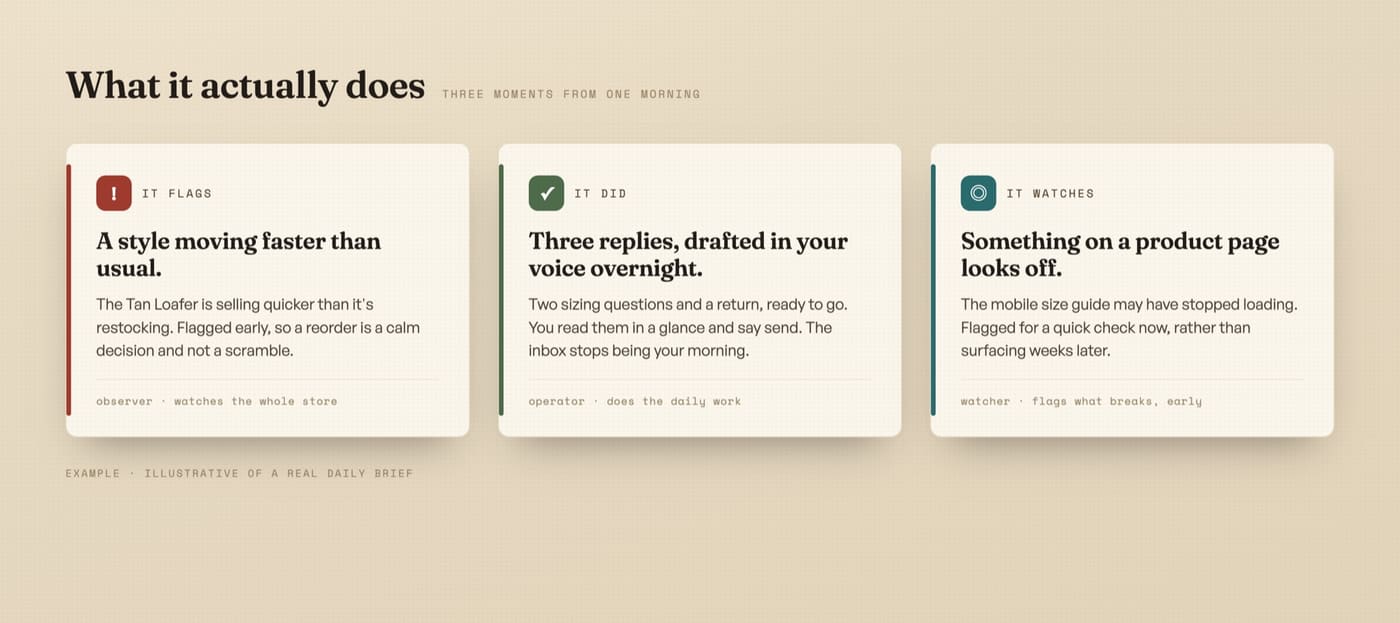 DNA’s custom AI cofounder system connects live to your store data, running single-threaded operational loops every morning.
Why small to medium businesses view AI differently
A large enterprise uses AI to cut headcount. A small or family-run business uses AI to give the existing team their time back.
Whether you run an online storefront, an offline family business, or a hybrid operation, the bottleneck is almost never a lack of strategy or hard work. The bottleneck is the sheer volume of repetitive administrative tasks that pile up before lunch:
- Checking overnight orders, inventory syncs, and delivery exceptions
- Answering the same customer support questions for the tenth time this week
- Reviewing ad accounts, local listings, and daily ad spend
- Writing social updates and promotional copy from scratch every single time
- Reconciling weekly numbers across separate accounting and store platforms
When a solo founder or family team holds all those tasks manually, the business hits a growth ceiling. You cannot scale because every new customer adds another 15 minutes of operational maintenance to a day that is already full.
You do not need to be technical to use AI
The single biggest misconception small business owners have is that you need a technical background, coding skills, or a degree in computer science to use AI effectively.
You do not.
A properly integrated AI system speaks plain English. You do not write lines of code or memorize complex prompt commands. You talk to it the exact same way you would talk to a trusted store manager or senior team member:
- “Check yesterday’s orders and tell me if any delivery is stuck.”
- “Draft a friendly response to this customer asking about returns.”
- “Look at our ad spend for the week and highlight anything unusual.”
If you can send a text message or write an email, you already have all the technical skill required to operate an AI-assisted business.
The four levels of integrating AI into an existing business
Integrating AI into an existing business is not an all or nothing decision. It happens in four clear levels:
| Level | What it looks like | What it handles | Human role |
|---|---|---|---|
| Level 1: Chatbot Q&A | Copying text back and forth into a browser tab | One-off emails, basic proofreading | You drive every single prompt manually |
| Level 2: Task Prompts | Reusable prompt templates for specific jobs | Product descriptions, routine support drafts | You run the prompt when you remember |
| Level 3: AI Skills & MCP | Connected AI tools that read your live store data | Order checks, analytics audits, ad reviews | You trigger the skill and review the output |
| Level 4: An AI Cofounder | An operating system running your morning loop | The full daily sweep across orders, ads, and replies | You set the rules, review, and approve |
Most small businesses get stuck at Level 1 because using AI as an open text box feels like a second job. Moving to Level 3 and Level 4 is where the operational pressure actually lifts.
How to integrate AI into your morning routine (Step by Step)
If you want to start integrating AI into your business this week, do not try to automate everything at once. Start with the morning operating loop.
1. Standardize your daily sweep
Before you let an AI system assist you, document the exact steps you take every morning. Write down what you check first, what you check second, and what is safe to ignore unless an anomaly occurs.
If you want a proven template, you can download the daily operating loop cheat sheet, the exact morning checklist a real operating brand runs on.
2. Connect AI to your actual store data
Instead of asking AI generic questions, connect it to your live store, analytics, and customer channels through read-only integrations.
For example, when you run the storekeeper free audit pack, Claude reads your store profile, checkout health, and merchandising signals, handing back a plain-English report of what needs fixing this week without touching your live code.
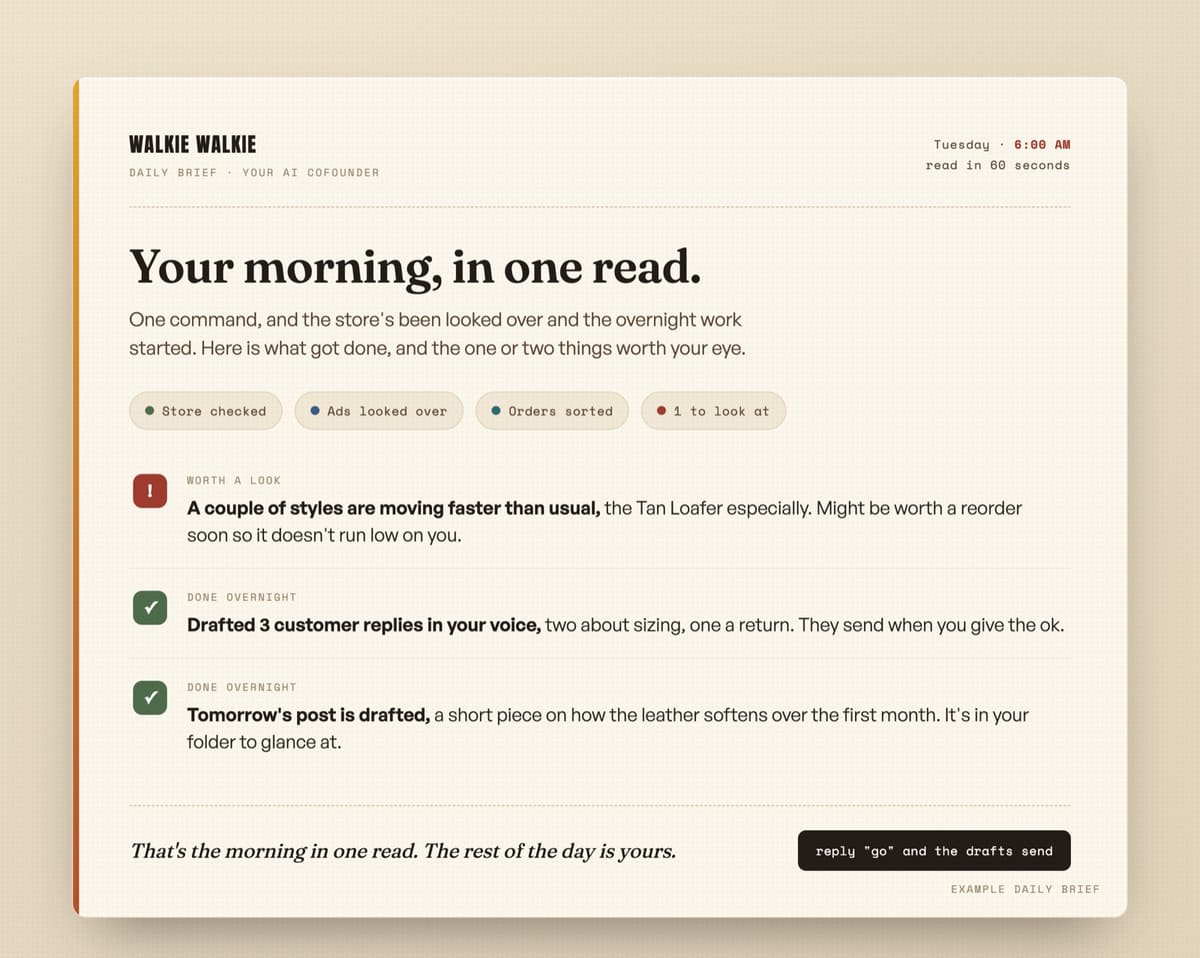 DNA’s storekeeper audit system hands back a scored morning report card highlighting conversion leaks and operational priorities.
3. Automate routine customer communication
Customer support and follow-ups take hours every week, but 80 percent of incoming inquiries fall into predictable categories: order status, shipping times, returns policy, and product fit.
Rather than writing every email from scratch, use proven email frameworks. You can reference the email marketing bible for Claude to set up automated welcome sequences, abandoned checkout reminders, and customer re-engagement flows that run in the background 24 hours a day.
4. Give your AI clear operating rules
An AI assistant without rules behaves like an unpredictable chatbot. Give it a written operating manual (CLAUDE.md) that pins your brand voice, customer promises, and single-threaded task rules.
To see how this works in practice, explore the Claude Code starter kit, which includes the exact folder structure and operating rules we use for every store we build for.
Offline businesses vs online storefronts: Where AI fits
Whether your business operates online, offline, or as a hybrid service, the integration points are identical:
- For Online E-commerce Brands: AI monitors cart abandonments, checks ad spend efficiency, drafts email flows, and audits checkout conversion leaks.
- For Offline & Family-Run Businesses: AI drafts customer quotes, handles routine email inquiries, formats local promotion copy, and summarizes weekly financial reports so family members do not spend evenings on admin.
In both cases, AI handles the mechanical work so you and your team can focus on face-to-face customer service, product quality, and high-level decisions.
How much time does AI integration actually save?
Handing your morning routine to an AI system will not magically double your revenue overnight, and anyone promising that is selling fantasy.
What a proper AI integration does is give back 2 to 3 hours every day that currently disappear into routine maintenance. That is time you can spend talking to customers, improving products, or simply ending your workday on time.
How DNA builds custom AI solutions for your business
If setting up integrations, writing operating rules, and connecting AI tools sounds overwhelming, you do not have to do it alone.
At Daily Needs Association (DNA), we build custom, done-for-you AI operating systems tailored specifically to small, family-run, and medium businesses. We take your real operational workflow, your brand voice, and your store data, and build a custom AI cofounder system that runs your daily morning check for you.
 DNA’s custom AI cofounder system connects live to your store data, running single-threaded operational loops every morning.
You get the full operational leverage of a modern AI system without hiring expensive developers, writing a single line of code, or taking time away from running your business.
Next steps for your store or business
If you want to see what AI integration looks like for your specific business, start with a concrete read rather than a generic guess.
Take a look at our free resources shelf for open kits and cheat sheets, or request a free store review. Tell us where your store lives, and we will send back a plain-English teardown of what an AI system would watch, run, and handle for you every morning.

Tired of generic SEO fluff when searching for store fixes?
Google Search is packed with affiliate articles by people who never ran a store. Tell Google to prioritize real e-commerce field notes, working code, and honest math whenever you search.